Technology should enable education, not inhibit it. Stoneware’s LanSchool allows you to take control of technology in the classroom so that you can monitor, collaborate and communicate with your students more effectively.
DESIGNED FOR EDUCATORS
GUIDE CLASSROOM LEARNING
Promote positive redirection through private student-teacher messaging and monitor screens with Website Limiting and Blank Screen functions.
PROMOTE COLLABORATION
Easily share your screen with the class to distribute materials, administer quizzes and polls, and highlight outstanding student work.
MAKE THE MOST OF CLASS TIME
Manage multiple classroom activities all within one simple platform and customize your settings to easily access frequently used features.
Take The Tour
What’s new in the latest version?
Notable new Insight enhancements include:
Fixed over 200 customer-reported issues
Added Keystroke Alerting for Chromebook students
Included Keystroke Alerts event logging in the Insight Report Server
Receive screenshots when banned word event is triggered
Resolved dual-monitors issue with Windows 10
Add option to disable video streaming
Key Features
Monitor Students
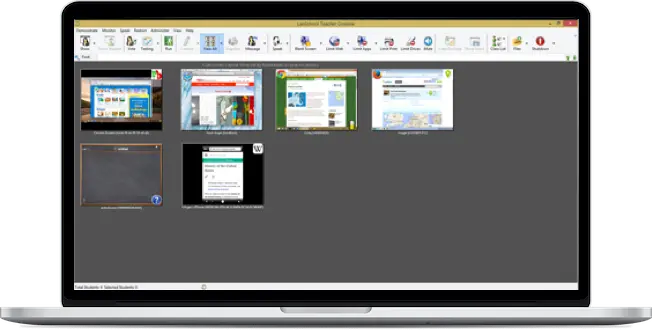
Monitor students by using the Thumbnail view to quickly see each student’s screen. You can monitor up to 3,000 students at a time, and dual monitors are supported. The Details View shows columns of information about students. Useful information, such as last application run, as well as last website visited is shown. ScreenFeed rotates through student screens, allowing teachers to monitor student screens from a distance. Other features such as Screen Snapshot, Internet History and Keystroke Monitoring helps maintain a safe environment for all students.
Remove Distractions
Getting the attention of students with technology in their hands is difficult at best. The Blank Screens feature allows you to focus your students’ attention to the front of the classroom by blanking all student screens. In addition, you can keep your students focused on the task at hand by limiting their access to specific web sites and applications that are running on their computers.
Teach
Teach more effectively by broadcasting the teacher screen to the rest of the class. Show a student screen to the rest of the class as positive reinforcement. Remote control a student’s desktop to help with key concepts. You can easily co-browse the internet, so students go exactly where you do. Make questions fun by randomly choosing a student using LanSchool.
Communicate
The communication features found in LanSchool help teachers more effectively communicate with students within the classroom. Teachers can audio chat, send a message to keep a student on task, chat with an individual or group of students and answer questions quickly with the communication features found in LanSchool.
Communicate
The communication features found in LanSchool help teachers more effectively communicate with students within the classroom. Teachers can audio chat, send a message to keep a student on task, chat with an individual or group of students and answer questions quickly with the communication features found in LanSchool.
Assess Student Progress
Use the powerful features of LanSchool to assess student progress, either by asking for quick responses with the voting function, or using Assessment Mode for a test. Assessment mode addressed the PARCC testing requirements to lock down a device during a test, preventing students from leaving the test, or going to unauthorized websites or applications. An audit log lets you know what actions were performed on both the student and proctor machine.
Save Time
Save precious teaching time by using LanSchool to send and collect homework assignments to students. Use the capabilities of LanSchool to power on, logoff, restart and power off machines from the teacher console.
1:1 Support
Support 1:1 initiatives with LanSchool by using Class Lists to automatically discover and bring in student devices at the start of class. Monitor battery life on student devices so that you are never caught unaware by a low battery.
LanSchool offers the most comprehensive set of classroom guidance features for Windows, Mac OS, iOS, Android and more.
Hosted on your local server
Easy access to software upgrades and support
Clever integration
Tech Console for simple IT management
Exclusive features include: Broadcast Screen, Vote, Testing, Internet History, Keystroke History and more
Current LanSchool Customers In Malaysia
Get free consultation for your classroom management needs today.
Hi there, Janice here from Muntada Group 😊 What are you hoping to sort out today — iSpring, NetSupport classroom management, or HRDC-claimable training?
Quick Inquiries
Hi 👋 Need help with iSpring, NetSupport or HRDC-claimable training? Chat with me!